How to Boost Inventory Management Efficiency with Handheld Printers
Introduction:
Key Takeaways:
- Why handheld printers improve efficiency: They eliminate travel time to fixed printing stations, enable real-time label generation, and integrate with warehouse management systems for instant data updates.
- Problems with stationary label printers: Centralized printing creates workflow interruptions, adhesive labels add ongoing supply costs, and pre-printed labels become obsolete when inventory data changes.
- How to solve this when upgrading: Replace stationary units with portable handheld inkjet printers that support variable data printing, fast-dry inks, and direct-to-surface marking—eliminating both travel time and label stock expenses.
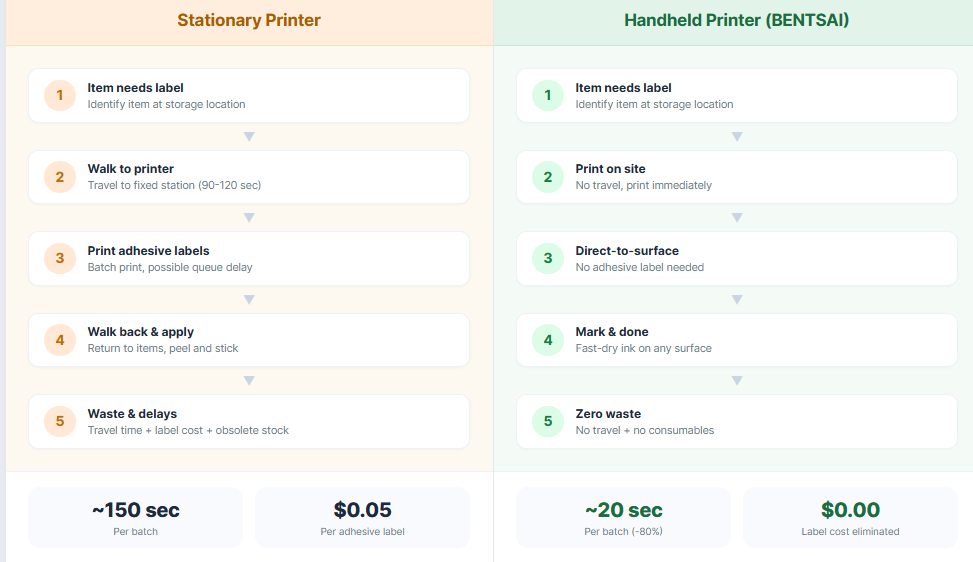
Inventory management efficiency depends on accurate, timely labeling. But traditional label printing creates bottlenecks: employees walk to centralized stations, wait for labels to print, then return to apply them. This back-and-forth consumes hours daily.
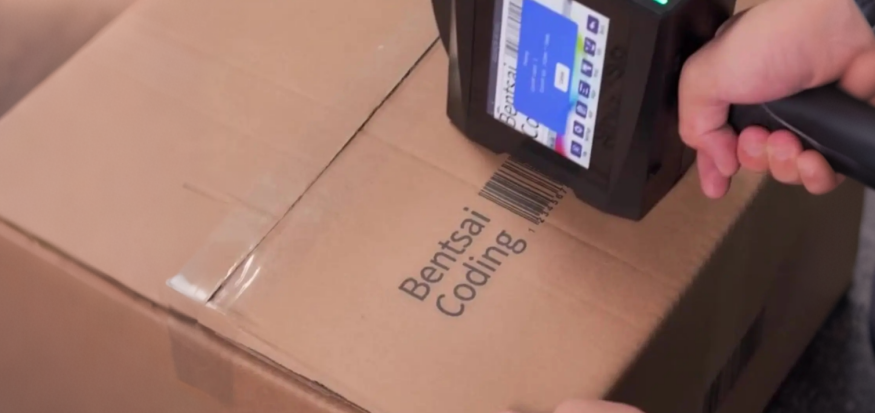
Handheld printers solve this by bringing printing directly to the product. A warehouse worker carrying a portable handheld inkjet printer can generate barcodes, dates, and batch codes on the spot—right where items are located.
What is Decentralized Inventory Labeling?
It is the practice of printing barcodes, dates, and batch codes directly on items at their warehouse location using a portable printer, rather than printing adhesive labels at a central station.
This approach turns every shelf, pallet, or conveyor belt into a labeling point. Workers scan an item, input data via Bluetooth or touchscreen, and print immediately. No walking. No waiting. No wasted labels.
4 Ways Handheld Printers Reduce Warehouse Costs
1. Real-Time Barcode and QR Code Generation
When inventory arrives or moves, labels must reflect current data. Stationary printers require pre-printing batches—but if a batch code changes or a pallet gets re-routed, those labels become waste.
Handheld printers generate codes on demand with simple USB file transfer. Before a shift begins, workers load the latest SKU data, batch numbers, or expiration dates onto the printer via USB connection. Once on the warehouse floor, they select the appropriate file and print directly onto items—no network dependency, no connectivity dropouts. This eliminates obsolete labels and reduces miscans caused by outdated information, while keeping the process simple and reliable in any warehouse environment.
2. Eliminating Adhesive Label Costs (Direct-to-Box Printing)
Adhesive labels have hidden costs: the label stock, the backing paper disposal, the adhesive that fails on dusty cardboard, and the labor to peel and apply each one.
Direct-to-box printing marks corrugate, kraft paper, and poly bags without any consumable label. A single handheld printer pays for itself in label material savings within months for medium-volume warehouses.
3. Seamless Integration with WMS and RFID Systems
Modern handheld printers receive variable data directly from your inventory database. Scan a pallet ID, and the printer automatically generates the correct barcode, batch number, or expiration date.
For advanced tracking, these devices also encode RFID tags or print human-readable text alongside scannable codes—keeping both automated systems and floor staff synchronized.
4. Printing on Uneven and Non-Porous Surfaces
Cardboard seams, curved plastic totes, and metal racks reject adhesive labels. Labels peel, bubble, or fall off entirely.
A handheld printer for printing on uneven surfaces marks directly onto these challenging materials. For non-porous surfaces like shrink wrap or coated boxes, selecting the right fast-dry solvent ink cartridges ensures permanent, smudge-resistant marks.
Industry Application Examples
Healthcare & Pharmaceuticals
Hospitals and pharmacies track thousands of high-value items with strict expiration requirements. Mislabeling patient samples or medications creates safety risks.
Using handheld printers, the Montevergine Clinic in Italy reduced inventory discrepancies by implementing decentralized labeling across their pharmaceutical stores. Nurses print barcodes and expiration dates directly on medication packages at the point of use, eliminating transcription errors.
Source: Roche Navify Case Study
Retail & E-commerce Logistics
Peak seasons overwhelm fixed printing stations. When order volume spikes, workers need to label returns, repacks, and outgoing shipments immediately—not wait in line for a shared printer.
Portable printers allow floor staff to label as they pick and pack. The U.S. barcode scanner market, which includes handheld printers and readers, continues growing as logistics operations demand real-time tracking tools.
Source: U.S. Department of Commerce Statistics
Manufacturing & Raw Materials
Pipes, cables, chemical drums, and lumber come in non-standard shapes that resist adhesive labels. Stencils and spray paint are imprecise and labor-intensive.
Handheld inkjet printers mark directly on curved plastic pipes, metal beams, and fabric rolls. High-resolution QR codes survive abrasion, moisture, and UV exposure—ensuring raw materials stay traceable through production.
Key Features to Look for in a Warehouse Inkjet Printer
- Ink Compatibility: Fast-dry solvent inks bond to non-porous surfaces (shrink wrap, coated cardboard, plastic). Water-based inks work on uncoated paper and raw wood. Choose based on your primary packaging materials.
- Print Resolution: 300 DPI suffices for basic date codes. For detailed tracking, modern barcode printers and QR code printers offer high-resolution 600 DPI prints—ensuring even small QR codes scan reliably.
- Hardware Attributes: Look for photoelectric sensors (for conveyor auto-printing), touchscreen interfaces, rechargeable batteries lasting full shifts, and rugged casings that survive warehouse drops.
Frequently Asked Questions
Q1: Can handheld printers print readable barcodes?
Yes. Modern handheld inkjet printers produce high-definition barcodes and QR codes at 300–600 DPI, fully compliant with ISO scanning standards. These codes scan reliably on cardboard, plastic, metal, and wood.
Q2: What surfaces can portable inkjet printers mark?
They mark porous surfaces (corrugated cardboard, raw wood, paper) and non-porous surfaces (shrink wrap, coated boxes, poly bags, plastic, glass, metal) when paired with the correct fast-dry solvent or UV-curable ink. Uneven surfaces like corrugated flutes and curved pipes are also printable with proper print head positioning.
About the Author

Matty Chen is an Inkjet Application Engineer, and BENTSAI Inkjet Printing technology Consultant. He specializes in industrial inkjet printing technologies, with a focus on handheld printers, thermal inkjet systems, and coding solutions. His work explores ink performance, material compatibility, and practical printing applications for businesses across manufacturing, packaging, and product customization industries.
Ask Question
No questions and answers

