GS1-128 Compliance & Real-Time Variable Data Printing Guide
If you ship products to retailers or distributors, you've probably been asked for a GS1-128 barcode. It's the barcode that carries batch numbers, expiration dates, and serial numbers all in one scan.
This guide covers what GS1-128 is, how it's different from a regular barcode, and how to print compliant codes with changing data using a handheld inkjet printer.
- GS1-128 is a Code 128 barcode with special tags called Application Identifiers (AIs). These tags tell the scanner what each piece of data means.
- A hidden character called FNC1 is what makes a barcode "GS1-128." It tells the scanner the data follows GS1 rules.
- Handheld TIJ printers can print GS1-128 barcodes with fresh data every time—no pre-printed labels needed.
- You need at least 300 DPI, ideally 600 DPI, for barcodes that scan on the first try.
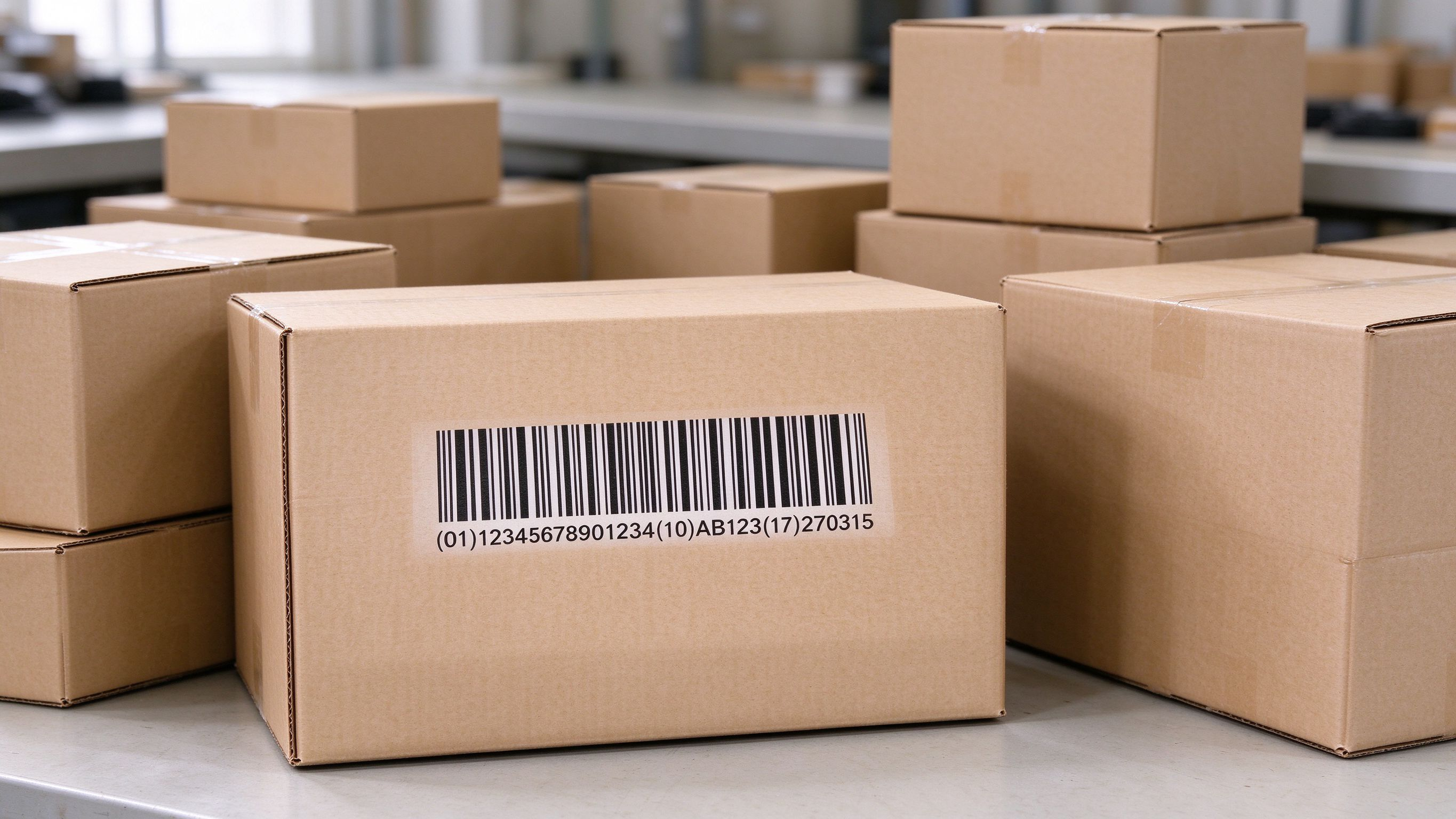
What is GS1-128 Compliance and Why Does It Matter?
GS1-128 is a barcode standard used on shipping cartons and pallets, not at retail checkout. It's built on Code 128 but adds Application Identifiers—short number codes that label what each piece of data means, like batch number or expiry date. A special FNC1 character tells the scanner it's a GS1-128 barcode.
Retailers like Walmart require it for food traceability, and healthcare systems use it to track medicines and devices.
Basic Definitions of GS1-128 and Code 128
Code 128 is a barcode type that can hold letters, numbers, and symbols. It's flexible, but it has no built-in structure—you can put any text in it.
GS1-128 is Code 128 with a rulebook. It adds a special marker right after the start of the barcode. That marker tells the scanner: "The data here follows GS1 rules, and each piece is labeled with a code."
So: GS1-128 = Code 128 + GS1 rules + that special marker (FNC1).
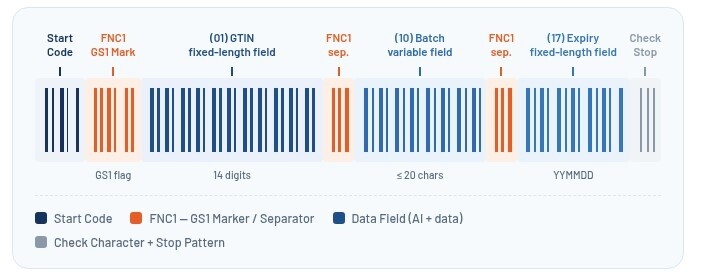
Core Entity Attributes: Application Identifiers (AIs) and the FNC1 Character
Application Identifiers (AIs) are short number codes that label each piece of data. Think of them as name tags. For example:
- AI (01) = the product's GTIN (a 14-digit product ID)
- AI (10) = the batch or lot number
- AI (17) = the expiration date (YYMMDD)
- AI (21) = the serial number
The FNC1 character does two jobs. First, it marks the barcode as GS1-128. Second, it acts as a divider between data fields that can vary in length, like batch numbers. Fixed-length fields like GTIN and dates don't need a divider—the scanner knows exactly how many digits to read.
The Role of Variable Data Printing (VDP) in Modern Logistics
Variable data printing means every code can be different—a new serial number, a new batch code, a new date. In logistics, this is how you track individual items.
What is Real-Time Variable Data? GTINs, Expiry Dates, Serial Numbers
Real-time variable data means the printer creates the code at the moment of printing, not from a pre-printed label. The data can come from a USB file, a database, or typed in on the printer's screen.
Common fields in a GS1-128 barcode:
- GTIN: the product ID (same for all units of the same product)
- Batch/Lot: changes with each production run
- Expiry Date: changes per batch
- Serial Number: unique for every single unit
Bentsai handheld printers can load data from a USB file (TXT or CSV) and print a different code for each item without stopping the line.
Traditional Pre-Printed Label Bottlenecks vs. On-Demand Direct Coding
Pre-printed labels cause problems. If the batch number changes, you either throw away the leftover labels or stick a new label over the old one. You also pay for label paper, backing paper, and the time it takes to peel and stick each one.
On-demand direct coding fixes this. You print the GS1-128 barcode right on the box at the moment you pack it. No label paper. No waste. No outdated stock. And the data is always current.
For businesses that need flexibility across multiple lines or seasonal runs, on-demand variable data printers are a practical alternative to fixed label systems.
How Handheld Inkjet Printers Enable Real-Time GS1-128 Compliance
Handheld inkjet printers bring GS1-128 coding right to the product. No fixed station, no label application. They work well in warehouses, on production lines, and in the field.
Thermal Inkjet (TIJ) Technology and High-Resolution Barcode Accuracy
Thermal Inkjet (TIJ) printers use heat to fire tiny ink droplets onto the surface. The result is high resolution—usually 300 to 600 DPI—which makes sharp, scannable barcodes.
For GS1-128, resolution matters. A barcode with fuzzy edges or uneven bars won't scan. Bentsai handheld TIJ printers, like the BT-HH6105F, print at 600 DPI—sharp enough for reliable scanning.
Printing on Porous vs. Non-Porous Surfaces Using Specialized Inks
You can print GS1-128 barcodes on almost any packaging—but the ink has to match the surface.
- Water-based ink is for surfaces that soak up liquid: cardboard, paper, wood, and uncoated kraft. The ink sinks in and dries fast.
- Solvent-based (fast-dry) ink is for surfaces that repel liquid: plastic, glass, metal, and coated cartons. The ink sticks to the surface and resists smudging.
Bentsai offers both ink types. The B30 and B80 use water-based ink for porous materials. The B35 and B85 work with both water-based and solvent-based cartridges.
Step-by-Step Implementation Guide for Warehouse and Production Teams
Data Structuring, Formatting, and Check-Digit Validation
Before you print, get your data in order.
Step 1: Pick your AIs. Decide what data you need. Most GS1-128 labels include AI (01) for the GTIN. Add AI (10) for batch, AI (17) for expiry, or AI (21) for serial number if needed.
Step 2: Format the data. Fixed-length AIs (01, 17) have a set number of digits. Variable-length AIs (10, 21) can be up to 20 characters. If you use more than one variable-length AI, separate them with FNC1 in the barcode—but not in the text people read.
Step 3: Check the check digit. GS1-128 uses a check digit (modulo 103). Most barcode software and printer firmware calculate this for you. If you're typing data by hand, double-check the check digit before printing.
Scanning, Verification, and Quality Control Workflow
Step 1: Scan right away. After printing, scan the barcode with a standard GS1 scanner. If it doesn't scan on the first try, adjust resolution or ink.
Step 2: Check the quiet zones. GS1-128 needs a blank margin (quiet zone) at least 10X wide on each side of the barcode. Make sure nothing prints in that space.
Step 3: Check the readable text. The numbers and letters printed below the barcode should match the encoded data. The brackets around AIs are for humans—they're not part of the barcode.
Step 4: Write down your settings. Once you have a setup that works, record the printer model, ink type, resolution, and speed for each packaging material. That's your standard procedure.
Frequently Asked Questions on GS1-128 Printing
Q: Can handheld printers achieve high DPI for scannable GS1-128 barcodes?
A: Yes. Bentsai handheld TIJ printers reach up to 600 DPI on models like the BT-HH6105F. At 600 DPI, the narrow bars and spaces in a GS1-128 barcode are printed precisely enough to scan reliably. For larger barcodes or less demanding jobs, 300 DPI is often enough.
Q: How to handle variable length Application Identifiers in the field?
A: Variable-length AIs (like AI 10 for batch number) need an FNC1 separator when another AI follows. Most barcode design software handles this automatically. If you're building barcodes by hand or importing from a USB file, make sure your data string includes FNC1 between variable-length fields. In the readable text, you'll see brackets or spaces—but the scanner sees FNC1. For handheld printer use, the easiest path is to use a barcode template that already handles FNC1. Bentsai printers support importing barcode data from TXT or CSV files, and the firmware does the encoding for you.
In Conclusion
GS1-128 compliance isn't just about printing a barcode—it's about putting the right data in the right structure so scanners can read it anywhere in the supply chain. With a handheld TIJ printer and the right ink for your packaging, you can print compliant GS1-128 codes on demand, with fresh data every time. No pre-printed labels, no waste, no bottlenecks. Test your codes with a scanner before full production, and write down your settings so every run is consistent.
About the Author

Matty Chen is an Inkjet Application Engineer, and BENTSAI Inkjet Printing technology Consultant. He specializes in industrial inkjet printing technologies, with a focus on handheld printers, thermal inkjet systems, and coding solutions. His work explores ink performance, material compatibility, and practical printing applications for businesses across manufacturing, packaging, and product customization industries.
Ask Question
No questions and answers

