Complete Guide: Find Affordable Portable Inkjet Printers Nearby
Are you on the hunt for an affordable portable inkjet printer that fits your needs without breaking the bank? Whether you need to print documents on the go for work, school assignments, or personal use, finding the right device nearby can be a breeze with the right strategies. This guide will walk you through every step—from defining your requirements to choosing the best purchase channel and securing the best deal. Let's dive in!
Determine Your Needs
Before you start searching for "affordable portable inkjet printers near me," it's crucial to clarify what you really need. This will help you avoid overspending on features you won't use and ensure you get a printer that fits your lifestyle.
Intended Use
Start by clarifying what you plan to print, as this directly determines the printer type, ink compatibility, and automation level required.
1. Basic Printing Applications
(1) Text, logos, and barcodes
(2) Dates, batch numbers, and simple product labels
These are standard identification tasks commonly used in packaging, warehousing, and light manufacturing.
2. Advanced & Production-Oriented Applications
(1) Variable data printing (e.g. serial numbers, QR codes, dynamic batch information)
(2) Automatic printing on conveyor lines using photoelectric sensors, enabling hands-free, synchronized marking during production
If your workflow involves continuous output, traceability, or automated production lines, selecting a printer that supports variable data and sensor-triggered printing is essential.
Volume & Frequency
- Light Use: Occasional printing means you can choose an entry-level and budget-friendly model portable inkjet printer.
- Daily or Production-line Use: Frequent printing requires printers with quick ink drying time, higher durability and large battery capacity.
Connectivity Needs: How Will You Connect?
Consider how you'll pair your devices with the printer:
- Wi-Fi: Ideal for wireless printing from phones, laptops, or tablets—perfect for home or small office use.
- Bluetooth: Great for on-the-go printing directly from your smartphone without a Wi-Fi network.
- USB: A reliable wired option for direct connection to a single computer (good for those who prefer a stable link).
- Other Options: Some models offer cloud printing or USB-C compatibility for modern devices.
Printer Size: How Portable Do You Need It?
Portable inkjet printers come in two main types, each with its own pros and cons:

1. Pocket Portable Inkjet Printer
Key Features:
- Fits in a pocket or small bag;
- Connect via WIFI/Bluetooth and control printing through an app
Pros: Ultra-portable, lightweight, easy to carry, and more budget-friendly
Cons: Limited print height; Shorter battery life
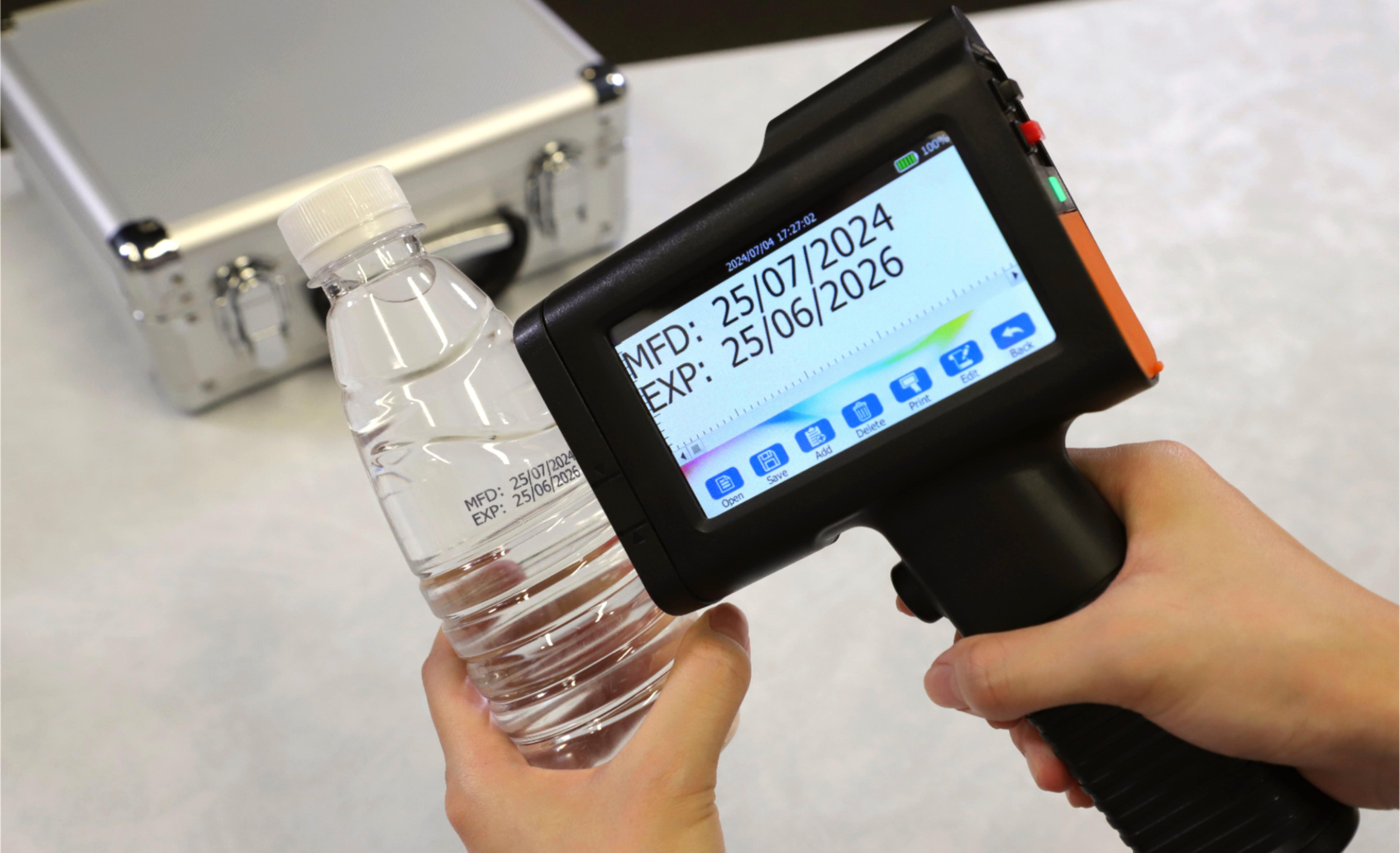
2. Portable Handheld Inkjet Printer
Key Features:
- Gun-shaped or handle-equipped design;
- Built-in touchscreen for direct printing operation;
- Import files via a USB flash drive
Pros: Longer battery life; Wider printing height options; More coding options such as variable data coding; Ergonomic handle for fatigue-free labeling
Cons: Larger and heavier than pocket printers; Slightly higher upfront cost
How to decide which size do I need?
Ask yourself:
- Does the printer need to fit in a pocket for on-the-go use?
- Or will it mainly be moved between rooms or workstations?
For light, occasional tasks, a pocket-sized portable inkjet printer offers maximum convenience and portability.
For businesses that require greater flexibility, longer battery life, and support for variable data or continuous printing, a portable handheld inkjet printer is often the better long-term choice.
Choose Your Purchase Channel: Online vs. Offline
Once you know your needs, decide whether to buy online or offline—each channel has its own advantages and drawbacks.
| Purchase Channel | Pros | Cons |
|
Offline Purchase (Local Stores) |
|
1. Limited selection compared to online retailers 2. Prices may be higher (stores have overhead costs) 3. Fewer deals and discounts |
| Online Purchase |
|
1. Can't test the printer before buying 2. Shipping delays (though many offer 1-2 day delivery) 3. Returns may require shipping the product back |
Strategies for Finding the Best Price
Affordable doesn't mean sacrificing quality—use these strategies to find the best deal on a portable inkjet printer:
1. Use Price Comparison Tools
Tools like Google Shopping, PriceGrabber, or CamelCamelCamel let you compare prices across hundreds of retailers in seconds. Simply enter the printer model or "affordable portable inkjet printer" and see which store offers the lowest price.
2. Track Price History
Many online tools (like CamelCamelCamel for Amazon) track price fluctuations over time. This helps you spot trends—for example, portable handheld inkjet printers often go on sale during back-to-school season, Black Friday, Cyber Monday, or holiday sales. Set up price alerts to get notified when your desired model drops in price.
3. Watch Out for the "Ink Trap"
Some printers are cheap upfront but have expensive ink cartridges (the "ink trap"). Calculate the cost per page (total ink cost ÷ number of pages per cartridge) to avoid hidden long-term expenses. Look for models with high-yield ink options or refillable tanks—they're more cost-effective in the long run.
4. Look for Bundle Deals
Retailers often offer bundles that include the printer, extra ink cartridges at a discounted price. These bundles can save you 10-20% compared to buying items separately—perfect for heavy use buyers.
Alternatives: Refurbished and Used Printers
If you're on an ultra-tight budget, refurbished or used portable inkjet printers are great alternatives to new models.
Recommended Platforms
- Refurbished: Buy directly from brand websites (Epson Refurbished, Canon Outlet) or trusted retailers like Amazon Renewed. These printers are inspected, repaired, and tested to work like new—many come with a warranty.
- Used: Facebook Marketplace, Craigslist, or eBay are good for local used options. Always meet in person to test the printer before buying.
Pros and Cons of Non-New Products
| Pros | Cons |
|
|
In Conclusion
Finding an affordable portable inkjet printer near you boils down to your priorities:
- If you value convenience and selection: Shop online—use price comparison tools and track prices for the best deals.
- If you want to test before buying: Visit local electronics or office supply stores.
- If budget is your top concern: Consider a refurbished model from a trusted source.
By first defining your needs, choosing the right channel, and using smart pricing strategies, you'll find a portable inkjet printer that fits your lifestyle and budget.
Happy printing!
About the Author

Matty Chen is an Inkjet Application Engineer, and BENTSAI Inkjet Printing technology Consultant. He specializes in industrial inkjet printing technologies, with a focus on handheld printers, thermal inkjet systems, and coding solutions. His work explores ink performance, material compatibility, and practical printing applications for businesses across manufacturing, packaging, and product customization industries.
Ask Question
No questions and answers

